Articles by "Sky Root Guide"
Showing posts with label Sky Root Guide. Show all posts

Sky Vega 860S,L,K Root And CWM Recovery For Jellybean 4.1.2 |Tested||Without PC|

--------------------------------------------------------------------------
Android Root And Recovery Guide For Mobile Flashing
--------------------------------------------------------------------------

Root And Recovery For Sky Vega IM-A860L,S,K For Jellybean

Root Guide

Just Follow These Step's For Rooting
1- Download Framaroot.Apk And Install it Into Phone
2- After Installing Framaroot.Apk Open it And Click On Last Gandalf Option


After Click on Gandalf Option Restart The Phone And After Restarting, Open Menu And Check SuperSu App If It Appear Mean Your Phone Is Rooted
Also Download Root Checker App From Play-Store And Check Root Access

Recovery Guide

After Rooting Install CWM Recovery
Download CWM Recovery Package For Sky 860L,S,K
In This recovery Package Two Files One 860.IMG And Second is Recovery.Apk
After Download Recovery Package Extract This Folder And Copy Both File IMG And APK Into Phone And Install Recovery.Apk
After Installing Recovery Apk Open it |When You Open Recovery Tool After Installing It Give Root Access Simply Click On Grant Option 
Now Click On  Flash Recovery Like Image


Now Click On Other From Storage


When You Click On Other From Storage Then File manager Open Find .IMG File And Click On it


Now Your Phone Successfully Installed CWM recovery Enjoy

How To Root Sky Vega IM-A800S Without PC |Tested And Secure Method|

--------------------------------------------------------------------------
Android Root And Recovery Guide For Mobile Flashing
--------------------------------------------------------------------------

Very Simple Method Root With Framaroot.Apk Software
Download And Install It After Installation Open It And Click On |Gandalf|


Now Restart The Phone And Check Superuser App In Menu If it Appear 
So Your Phone Is 100% Gaining Rooting Access
Congratess :)

How To Flash Custom Recovery After Rooting

How To Flash Permanently CWM Recovery In Sky IM-A800S

--------------------------------------------------------------------------
Android Root And Recovery Guide For Mobile Flashing
--------------------------------------------------------------------------

Follow This Steps
1- Download Sky Driver P-VEGA
2- Download Fast-Boot Driver
Download These Both Drivers And Install, After Installation Restart PC
3- Now Download Soft C-W-M Recovery
4- Also Download Hard C-W-M Recovery
Download These Both Files
After Download These Both Files Follow This Steps :
Copy Hard Recovery File Into Phone Memory
Then:
1- Connect Phone With PC Via Data Cable
2- After Connecting Go-to Mobile Setting And Enable (U-S-B Debugging)


3-After Enabling U-S-B Debugging Extract Soft Recovery Folder
And Double Click on (Run_from_Fastboot_Arrow) And Wait
Mobile Auto Restart And Show C-W-M Recovery

When Recovery Is Showing up Then Follow This Steps:

1- Install Zip From Sdcard
2- Choose Zip From Sscard 
And Find Hard recovery.zip And Install it
Then Go back And Reboot System now
If you See Any Disable Recovery Option Simply go back 

Now C-W-M Recovery is Permanently Installed Enjoy :)

Note:
Your Phone Must Be Rooted. Then Flash Custom Recovery. If Your Phone is not Rooted So Please Root Firstly. 

Root and install CWM Recovery in Sky IM-850 L/S/K KIT-KAT Without PC 100% Tested

--------------------------------------------------------------------------
Android Root And Recovery Guide For Mobile Flashing
--------------------------------------------------------------------------

Root Guide

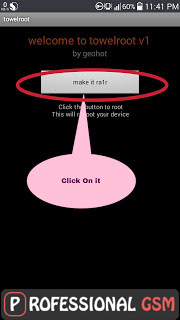
Download Towel Root Apk And Install it
After Installation Open It And Click On |Make It Ra1r|
And Wait |20-Second| Phone Auto Reboot

Recovery Guide

After Successful Gaining Root Access Download These Both Files From Here
1- Recovery Tool Apk
2- Sky 850 C-W-M Recovery
After Downloading Both Files Recovery And Apk Copy This Both File into Phone Memory 
1-install Recovery Tools in your phone and open it
2-Grant Root Access
3-Then it will give u option to backup your recovery
Make Backup 
4-Then Click On flash recovery


the other from storage


Then goto Sky 850 Recovery Folder
and choose Recovery.img


Then Your Phone Will be Rebooted And C-W-M recovery installed
Now Cheers you have successfully Rooted and install Recovery without PC :)

Android Root and Install Cwm Recovery In Sky A900 S/L/K Without PC 100% Tested |4.4-KK|

--------------------------------------------------------------------------
Android Root And Recovery Guide For Mobile Flashing
--------------------------------------------------------------------------


|Root Guide|

Download Towel Root Apk
After Download Copy In-to Phone And Install it
When Installation is Complete Then Open It
Now Click on |make it ra1r| And After 20-Sec Your Phone Will be Restart and Rooted

|Recovery Guide|

After Successful Gaining Root access Download These Both Files From Here

Recovery Apk

Sky A900S Recovery

Sky A900L Recovery

Sky A900K Recovery

1- install Recovery Tools in your Phone and Open it
2- Grant Root Access
3- Then it Will Give u Option to Backup Your Recovery
Make backup 
4- Then Click on |Flash recovery|


Then other from storage


Then Goto Sky A900 Recovery TWRP folder
And Choose Recovery.img


Then your Phone will be Rebooted and CWM recovery installed

Now cheers you have successfully rooted and install recovery without PC :)

Sky IM-A910S,L,K Root And TWRP Recovery 4.4 KK

--------------------------------------------------------------------------
Android Root And Recovery Guide For Mobile Flashing
--------------------------------------------------------------------------


|Root Guide| 

Download Towelroot.Apk And Copy Into Phone And Install 
After Installing Open it And Follow Instruction To Root
Then Do Recovery Process  

|Recovery Guide|

 First Of All Download Sky Mobile Driver And Fast-Boot Driver
In This Zip Package 2 Driver
1-PVEGA
2-Motrola
Download And Install Both Driver

|Now Download Recovery|


After Download Recovery Package Extract It
Now Putt Phone On Fast-Boot Mode By Pressing
|Volume Up + Down + Power Button|
Hold Until Screen Appear
When Fast-Boot Mode Is Appear Attached The Phone With PC Via Data Cable
Now Open Extracted Folder and Double Click On RunFastboot
:)

Sky IM-A900S,L,K Root And Recovery TWRP 4.4 Kitkat

--------------------------------------------------------------------------
Android Root And Recovery Guide For Mobile Flashing
--------------------------------------------------------------------------


|Root Guide|

Download Towelroot.Apk And Copy Into Phone And Install 
After Installing Open it And Follow Instruction To Root
Then Do Recovery Process 

|Recovery Guide|

First Of All Download Sky Mobile Driver & Fast-Boot Driver
In This Zip Package 2 Drivers
1-PVEGA
2-Motrola
Install Both Drivers
Now Download Recovery Package


Download Recovery And Extract It 
Now Putt Phone On Fast-Boot Mode By Pressing
|Volume Up + Down + Power Button|
Hold Until Screes Appear
When Fast-boot Mode Is Appear Then Attached Phone With PC Via Data Cable
Now Open Extracted Folder And Double Click On RunFastboot
:(

Sky IM-A890S,L,K Root And CWM Recovery KK

--------------------------------------------------------------------------
Android Root And Recovery Guide For Mobile Flashing
--------------------------------------------------------------------------


-------------------
Root Guide
-------------------

Root Your Device Via Framaroot Or Towel Root


 Try Any One Which You Like

----------------------
Recovery Guide
----------------------

First Of All Download Sky Mobile Driver And Fast-boot Driver
In This Zip Package 2 Drivers Available
1-PVEGA
2-Motrola
Both Installed One By One

---------------------------
Download Recovery
---------------------------


After Download Recovery Extracted Recovery Folder
Now Putt Your Phone On Fast-boot Mode
|Press Volume + Down + Power Button|
Hold It Until Screen Appear
When Fast-Boot Mode Is Appear Then Attached Phone With PC Via Data Cable
|PC Auto Detect And Install Some Driver On First Attached|
Now Open Extracted Folder And Double Click on
RunFastboot
 :)
If You Feel Any Problem During Installation So Please Share With me In Comment
Without Any Hesitation :)

Sky IM-A890S,L,K Root And TWRP Recovery JB

--------------------------------------------------------------------------
Android Root And Recovery Guide For Mobile Flashing
--------------------------------------------------------------------------

-----------------
Root Guide
-----------------

Download Towelroot.Apk And Copy Into Phone And Install 
After Installing Open it And Follow Instruction To Root
Then Do Recovery Process

----------------------
Recovery Guide
----------------------

In This Zip Package Two Driver
1-PVEGA
2-Motrola
Download And Install Both Driver Then
Putt Your Mobile Phone into Fast-Boot By Pressing
First Off Phone Then
|Volume Up + Down + Power Botton|
When Fast-Boot Mode Is Appear Then Attached Phone With PC Via Data Cable
|PC Auto Detect Some Driver On First Attached|
Now Open Recovery Folder And Double Click On
|Run Fast-Boot|


Root And Recovery Tool For All Sky Vega Mobiles

--------------------------------------------------------------------------
Android Root And Recovery Guide For Mobile Flashing
--------------------------------------------------------------------------

Download This Apk File And Copy into Phone And Install it
After Installing Open It And Follow instruction
Some Screen Shoots:-


About:-
Sky tool installed directly on the phone
It automatically detects the phone and recovery for file list appears you choose to install 
Requirement:- 
Section root (framaroot) only supports 850 or less from offline
Does the recovery phone only supports the sky and the sky behind the line where: A760, A770, A800, A810, A820, A830, A850, A870, A880, A890, A900. will continue to update

Sky IM-A880S Root And TWRP Recovery |Full Guide| 4.4Kitkat Only

--------------------------------------------------------------------------
Android Root And Recovery Guide For Mobile Flashing
--------------------------------------------------------------------------

-----------------------------
Android Root Guide
-----------------------------

Download Towelroot.Apk And Copy Into Phone And Install 
After Installing Open it And Follow Instruction To Root
Then Do Recovery Process

----------------------------------
Android Recovery Guide
----------------------------------

In This Package 2 Driver 
1- PVEGA
2- Motorola 
Download And Install Both Driver Then 
Putt The Phone Into Fast-Boot Mode By Pressing
|Press Volume Up + Down + Power| 
When Fast-Boot Mode Is Appear The
Attached Phone With PC Via Data Cable
|PC Auto Detect Some Driver On First Attached|
Now Open Folder TWRP And Double Click On
|skya880kikat|


Sky IM-A850S,L,K Root And Recovery All In One (CWM\TWRP) (Only For Jeallybean)

--------------------------------------------------------------------------
Android Root And Recovery Guide For Mobile Flashing
--------------------------------------------------------------------------


Download Framaroot.apk And Copy into Phone And Install it
After Installing Open And Click On Last Option { Gandalf }
Restart Phone And See Superuser Application In menu 
If Super User Appear Congrateees :)


Mobile Is Rooted Now You Able to install Custom Recovery
After Download Extract it
Enable USB Dubbing From Setting Developer Option


Now Open Extracted Folder And Click on Fastboot Option
When Mobile Going In fastboot 
Now Click on Recovery  Option And Follow Instruction:)

Sky IM-A830L Touch Recovery

--------------------------------------------------------------------------
Android Root And Recovery Guide For Mobile Flashing
--------------------------------------------------------------------------

Download Recovery APK
After Download Copy Into Phone And  Install It
Download Recovery.IM
After Download Recovery .IMG File Copy into Phone Memory
After Download Copy Into Phone And Flash Trough Recovery Apk


Find .IMG File From Phone Memory And Flash It

Sky IM-A860S,L,K TWRP Recovery

--------------------------------------------------------------------------
Android Root And Recovery Guide For Mobile Flashing
--------------------------------------------------------------------------

Download TWRP Recovery
After Download Copy This Zip File Into Phone
Goto CWM Recovery And Flash it
If You Dont Have CWM Recovery
So Follow This Click Here 

Sky IM-A860S,L,K Root And Recovery |4.4KK|


Download Towelroot Apk
After Download Install It In Phone
And Follow Instruction..
After Rooting Download CWM Recovery
After Download Recovery Extract it
Attached Phone With PC Via Data Cable|First On USB Deubing|
After Connecting Open Extracted Folder
 And Double Click On Recovery_Fastboot_860kk
And W8 if Not Working So put Your Mobile on Fastboot Mode Manually
By Pressing Volume UP + Down+Power 
Select FastBoot Then Attached With PC Via Data Cable
Then Again Run Recovery_Fastboot_860kk
Enjoy...:)
If you Feel Any Problem So Share With Me In Comment Without Any hesitation
If Haven't Drivers So Downlaod
Fastboot Driver Downlaod

TWRP Recovery V2.3 For Sky IM-A830S,K,L


If you Flash Recovery Through Computer So Download TWRPFastboot Recovery
1-Put Your Phone into Fastboot by Pressing Volume UP + Down + Power Then Attached With Pc Via Data Cable.
2-Open Folder Double Click on Run_twrp.bat And W8 
If You Flash Recovery Through CWM So Downlaod TWRPrecovery
1-Copy Zip file Into phone 
2-Goto CWM And install It
3-Goto Advance Click on reboot recovery 

TWRP Recovery V2.4 For Sky IM-A820L

-----------------------------SKY IM-A820L Only-----------------------------


What Is TWRP Recovery:)

Touch Recovery
Also Available Flash Through Recovery
If you have Costume Recovery So
Simple Copy This rar File To Phone Goto Recovery Or Install it

Sky IM-A870S,K,L Root Recovery 4.4 KK Only


Download towelroot
After Downlaod Copy Into phone And install it 
After installing Run it And Click On |Make It Ra1n|
And Wait 20-Second Phone Auto Reboot


After Gaining Rooting Success Download Recovery Tool
After Download Extract it
After Extracting Open Extracted Folder In This Folder 2 Files
1-Recovery Apk
2- Recovery.IMG
Copy These Both File In-to Phone
Install Recovery APK 
After Installing Recovery APK open It Click On Flash Recovery


Click On Other From Storage


Find Recovery.IMG And Click On it


Enjoyee,,,,,:)

Sky IM-A870S,K,L Root And Recovery For 4.1 JB Only |Without PC|


Download Root And Recovery Tool APK
After Download Copy into Phone And Install It
After Installing Run It
Click on Root >Download Root>Framaroot Downloaded
Install Framaroot And Click On Gandalf option
Restart Phone See Superuser App If Appear it 
Congrate Your Phone Is Rooted
After Rooting Again Run c.Cu Tool 
Now Click on Recovery>Download Recovery If Superuser Appear Click on Grant

Sky IM-A910S,K,L Root And Recovery 4.4KK


Download Sky Driver
Download Fastboot Driver
Download Towel Root.apk
Install it Run it And Click On |Make It ra1n|
Wait 20 Second
your mobile is rooted


Download Recovery Tool For A910S
 Download Recovery Tool For A910K
Download Recovery Tool For A910L
After Download Exctract It 
Putt Your Phone into Fastboot Mode by Press Volume up+Down+Power
And Select Fastboot now Attached With Pc Via Data Cable
Open Extract Folder Double Click On Runfastboot
If You Feel Any Problem Share With Me In Comment